Walk-Ins
Report parameters
|
Field |
Description |
|---|---|
|
Report Name |
The name of the report. |
|
Start Date |
The start date from when the data must be considered for generating the report. |
|
End Date |
The end date until when the data must be considered for generating the report. |
|
Include Non-Bedded Rooms |
When enabled, the system includes the non-bedded rooms associated with the available room types. |
|
Sort Options |
Available options include the following:
|
Sample Report
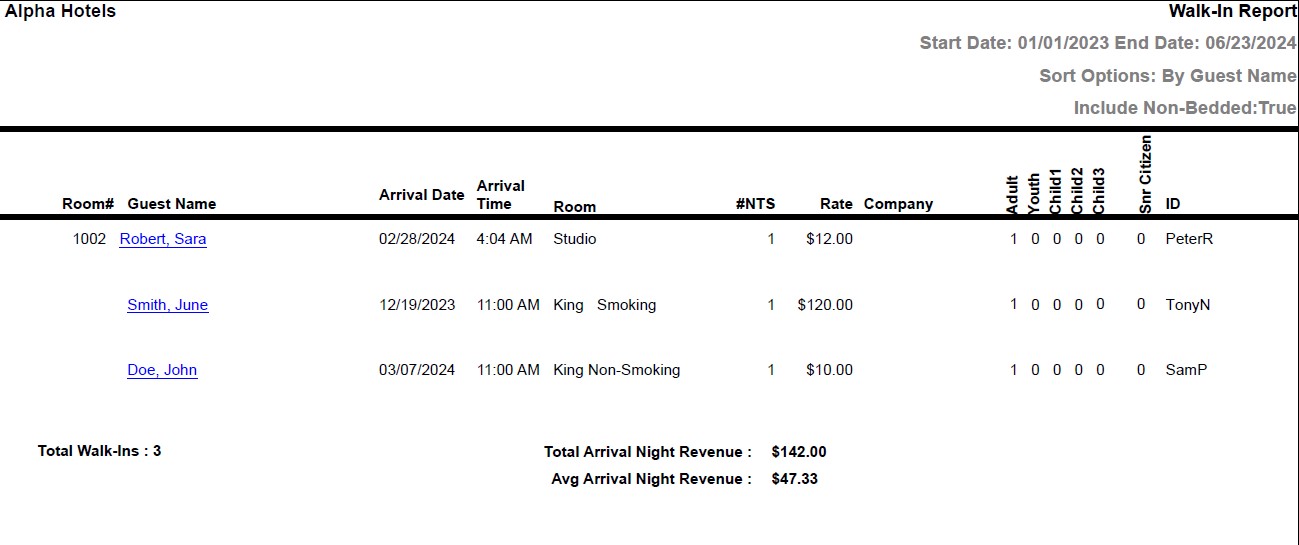
Report Fields
|
Field |
Description |
|---|---|
|
Room# |
The room number of the guest. |
|
Guest Name |
The last name and first name of the guest will appear as a hyperlink and clicking it will navigate the user to the guest record. |
|
Arrival Date |
The arrival date of the guest. |
|
Arrival Time |
The time the guest arrived. |
|
Room Type |
The room type to which the room number belongs. |
|
#NTS |
The number of nights for which the reservation is made. |
|
Rate |
The rate charged for the room. |
|
Company |
The name of the company to which the guest belongs. |
|
Adult |
The number of adults on the reservation. |
|
Youth |
The number of youths on the reservation. |
|
Child1 |
Number of children in the child 1 age category. |
|
Child2 |
Number of children in the child 2 age category. |
|
Child3 |
Number of children in the child 3 age category. |
|
ID |
ID of the user. |
|
Total Walk-Ins |
The total number of walk-ins in the selected date range. |
|
Total Arrival Night Revenue |
The sum of all revenue earned in the selected date range. |
|
Avg Arrival Night Revenue |
The average revenue earned in the selected date range. |